VEED vs SoulDub for Video Translation
Compare VEED and SoulDub for video translation: subtitle editing, dubbing revisions, downloadable files, and plan limits. Choose a workflow for your project.
If your video still needs trimming, resizing, and styled captions, VEED is a sensible place to handle the translation too. If the edit is finished and you need to work through the translated speech, SoulDub is worth trying on a short clip.
Both can help you produce a video in another language. The useful difference is what happens when the first version needs changing: where you correct a sentence, how you update the voice, and what you can hand over at the end.
Published by SoulDub. This comparison covers documented workflows, not a controlled voice-quality test. Product details were checked on November 4, 2026.
Start with what your audience needs to hear
Suppose you have a five-minute product demo in English and want a Spanish version. That can mean two quite different jobs.
You might keep the English narration and add Spanish subtitles. Viewers read the translation while hearing the original speaker. Or you might want the narration itself in Spanish, with subtitles alongside it.
VEED offers both routes. Its subtitle translation guide describes generating or uploading subtitles, adding a translation, and editing the text. Its AI Dubbing tool handles translated speech, with voice selection and optional lip-sync.
So “VEED only translates subtitles” would be an unfair comparison. It does dub video. The question is whether the particular workflow and plan give you the controls your job needs.
SoulDub’s workflow takes an uploaded video through translation and voice generation, then lets you review the source and translated lines. When a translated line needs changing, you can regenerate its speech and rebuild the video. That is a useful fit for a demo, lesson, or narrated walkthrough whose visuals are already settled.
Where VEED fits comfortably
A translated social clip may still need a tighter opening, a vertical crop, and captions that match the rest of a campaign. In that case, the surrounding editor matters as much as the translation.
VEED’s video translator page describes continuing to trim, resize, and style captions after translation. Keeping those jobs together can make sense, particularly if your existing projects are already there. There is little reason to move a caption-only job elsewhere just to add another tool to the process.
For a quick comparison, these are the decisions that matter:
| Your immediate job | What to look at |
|---|---|
| Translate captions and keep editing the video | VEED combines subtitle translation with its broader editor. |
| Check the translated script before generating a VEED dub | VEED documents Proofread and script upload as Enterprise features. Check your plan. |
| Revise individual lines in an already translated video | SoulDub documents segment speech regeneration followed by an updated video export. |
| Hand translated material to another editor | Check the actual video, subtitle, and audio files you can download from your project. |
These are workflow differences, not a ranking of translation quality. A feature list cannot tell you how either voice will handle your speaker, terminology, or language pair.
The sentence you need to change
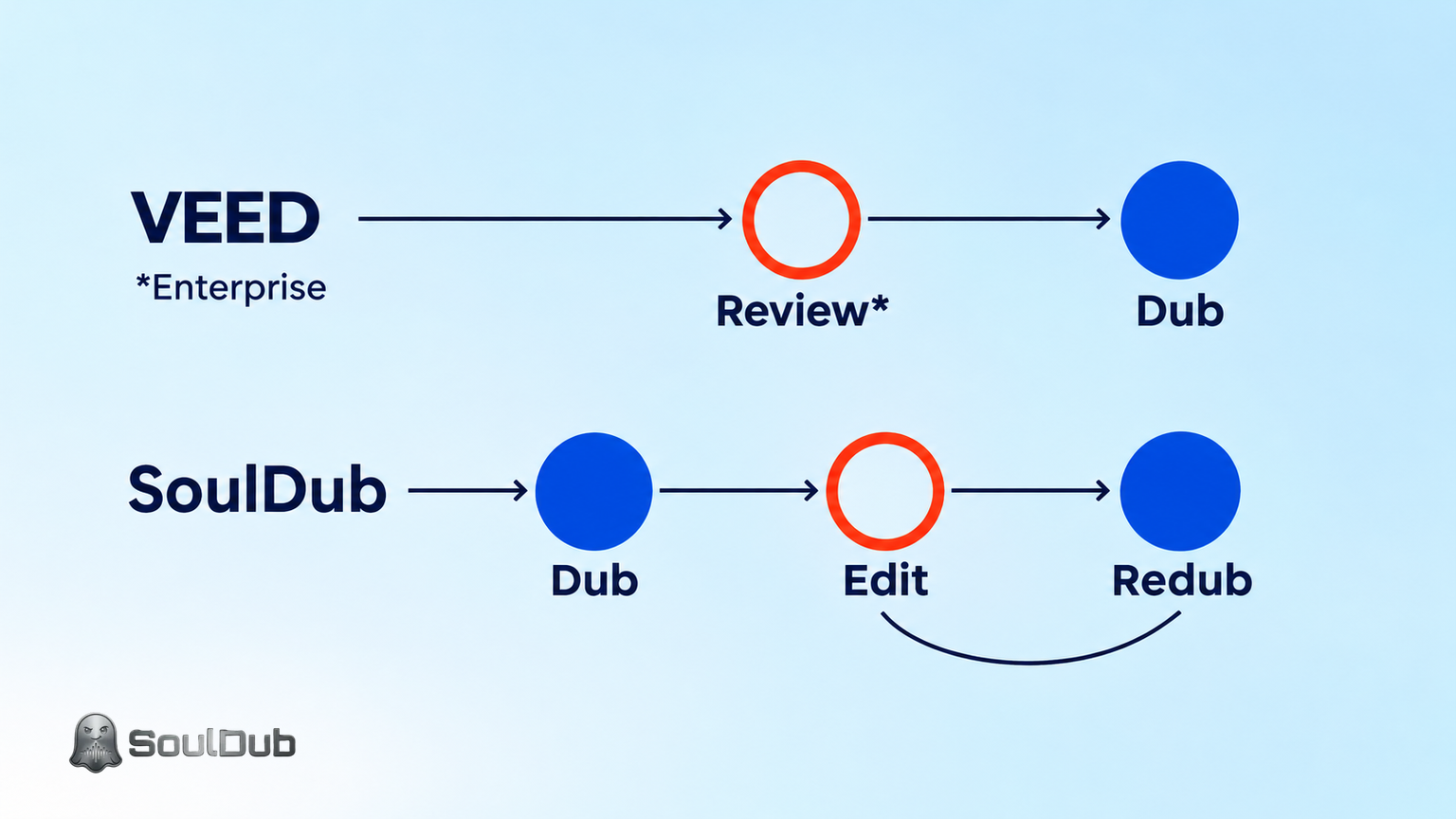
Two documented review paths: VEED’s Enterprise proofreading before dubbing, and a segment revision after the first result in SoulDub.
Take this example from a product demo: “Your trial ends on Friday.” Perhaps the intended message is “Your free trial ends this Friday.” That is a small text change, but the listener needs to hear it too. This is an illustrative revision, not an error observed in either product.
In a subtitled video, you can correct the caption. In a dubbed video, you also need to update the spoken line. Correcting visible text alone does not prove that the exported audio now says the same thing.
VEED provides a route for reviewing the translation before dubbing. Its AI Dubbing help article lists Proofread and script upload as Enterprise features. That restriction concerns the dubbing workflow; it does not mean ordinary subtitle-file upload is Enterprise-only. If reviewing the spoken script before generation is central to your work, this is a detail to check before choosing a plan.
SoulDub’s user guide describes a revision loop after the first result:
-
Open the subtitle editor and correct the translated segment.
-
Regenerate the affected segment’s speech.
-
Listen to that line together with the lines around it.
-
Update the latest video, wait for the new version to finish, and download it.
The third step deserves a little patience. A sentence can sound fine on its own and still arrive too abruptly after the previous one. Listen for a rushed ending, an odd pause, or a change in delivery where the new segment joins the rest.
There is also a practical distinction between finishing the line and finishing the file. The new voice needs to make it into the rebuilt video. Open the downloaded result and play the revised passage before you send it to anyone.
Decide what you are handing over

“The translated video” might be enough for a social post. It may not be enough for an editor who still needs to mix the sound, or a colleague who wants a separate subtitle track.
VEED documents downloading subtitle translations as files, as well as adding captions to the video. That distinction matters: text burned into the picture is different from a subtitle file your publishing platform can switch on and off.
SoulDub’s guide describes downloading the completed video and the subtitle or audio assets available for the task, including original, translated, and bilingual subtitles. Audio options depend on what the task has produced. Check the completed project for the files you need rather than assuming every asset is ready as soon as the first result appears.
For a handoff, write down the expected files before you start: perhaps a dubbed video and translated subtitles, or an audio track for further mixing. Then download that small set during your trial. It is a more useful check than discovering a missing deliverable after processing a whole batch.
Compare the allowance you will actually use
An attractive monthly price does not answer whether a plan covers your translation work.
VEED’s pricing FAQ separates subtitle generation from translation allowance. Its example is straightforward: translating a 30-minute video into one language uses 30 translation minutes; translating it into another uses an additional 30. “Unlimited subtitles” should not be read as unlimited translations or dubbing.
SoulDub’s pricing page uses credits and lists limits for each task’s duration, upload size, and concurrent jobs. The product shows an estimate before you create or rerun a translation operation. Saving video edits itself does not use credits, but that should not be taken to mean every regeneration operation is free.
For either product, check the cost of your intended languages, access to the correction tools, the maximum clip length, and the exports included. Use the same billing period when comparing prices. If you regularly revise scripts, check the cost of those revisions too.
Try a difficult 30 seconds before a whole project
Choose a 30–45 second excerpt from a video you are allowed to process. Include a product name, a number, and a sentence you expect to revise. If the real project has music or more than one speaker, use a sample that includes those conditions.
Run the same excerpt through each tool in your actual target language, within the trial or plan limits available to you. Then make one correction and export again.
Ask someone fluent in the target language to check the meaning and listen to the revised passage. Check whether names and numbers survived, whether the pace feels comfortable, and whether the downloaded files contain the latest changes. Note how much work it took to reach a version you would publish.
Keep VEED on the shortlist when translation is part of a wider editing job. Try SoulDub when your main task is reviewing translated speech in a video you have already edited. Neither choice removes the need to listen to the result.
To see whether SoulDub fits that second job, start with a short video, correct one line, and take it all the way through to the downloaded file. That will tell you more than a polished demo alone.
By
Evan Reed
SoulDub chief technical expert, focused on video translation technology, AI dubbing systems, and practical multilingual content workflows.